

Parolni tekshirish
CSS va JavaScript yordamida parolni tekshirish formasini yaratishni o‘rganing.
Parolni tekshirish
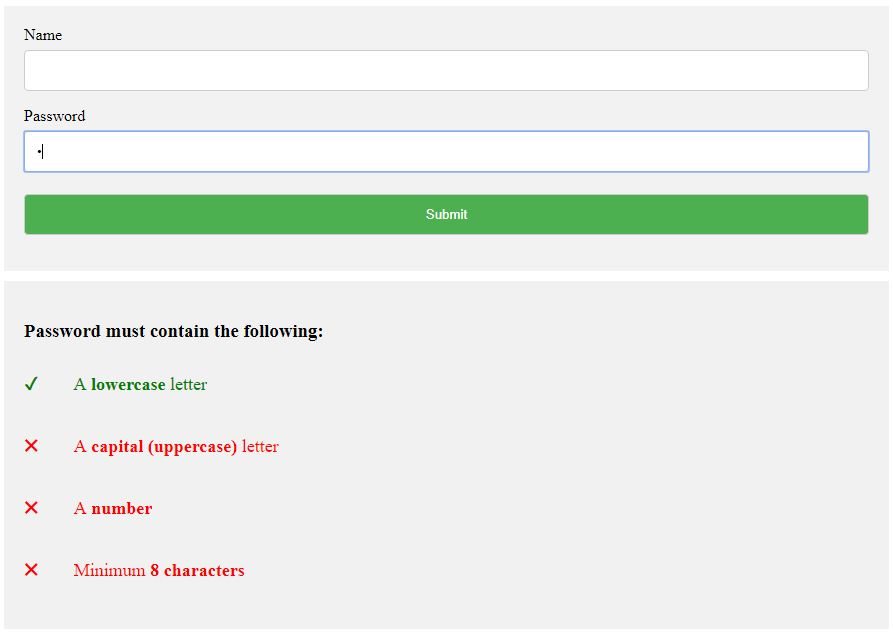
Parolni tekshirish formasini yaratish
1-qadam) HTML qo‘shing:
Misol
<div class="container">
<form action="/action_page.php">
<label for="usrname">Username</label>
<input type="text" id="usrname" name="usrname" required>
<label for="psw">Password</label>
< input type="password" id="psw" name="psw" pattern="(?=.*\d)(?=.*[a-z])(?=.*[A-Z]).{8,}" title="Must contain at least one number and one uppercase and lowercase letter, and at least 8 or more characters" required>
<input type="submit" value="Submit">
</form>
</div>
<div id="message">
<h3>Password must contain the following:</h3>
<p id="letter" class="invalid">A <b>lowercase</b> letter</p>
<p id="capital" class="invalid">A <b>capital (uppercase)</b> letter</p>
<p id="number" class="invalid">A <b>number</b></p>
<p id="length" class="invalid">Minimum <b>8 characters</b></p>
</div>
Eslatma: Formani yuborishga cheklov qo‘yish uchun parol maydonida pattern atributidan (muntazam ifoda bilan) foydalanamiz: parol kamida bitta raqam, bitta katta va bitta kichik harfni o‘z ichiga olgan 8 yoki undan ortiq belgidan iborat bo‘lishi shart.
2-qadam) CSS qo‘shing:
Kiritish maydonlari va xabar blokiga uslub bering:
Misol
/* Style all input fields */
input {
width: 100%;
padding: 12px;
border: 1px solid #ccc;
border-radius: 4px;
box-sizing: border-box;
margin-top: 6px;
margin-bottom: 16px;
}
/* Style the submit button */
input[type=submit] {
background-color: #04AA6D;
color: white;
}
/* Style the container for inputs */
.container {
background-color: #f1f1f1;
padding: 20px;
}
/* The message box is shown when the user clicks on the password field */
#message {
display:none;
background: #f1f1f1;
color: #000;
position: relative;
padding: 20px;
margin-top: 10px;
}
#message p {
padding: 10px 35px;
font-size: 18px;
}
/* Add a green text color and a checkmark when the requirements are right */
.valid {
color: green;
}
.valid:before {
position: relative;
left: -35px;
content: "✔";
}
/* Add a red text color and an "x" icon when the requirements are wrong */
.invalid {
color: red;
}
.invalid:before {
position: relative;
left: -35px;
content: "✖";
}
3-qadam) JavaScript qo‘shing:
Misol
<script>
var myInput = document.getElementById("psw");
var letter = document.getElementById("letter");
var capital = document.getElementById("capital");
var number = document.getElementById("number");
var length = document.getElementById("length");
// When the user clicks on the password field, show the message box
myInput.onfocus = function() {
document.getElementById("message").style.display = "block";
}
// When the user clicks outside of the password field, hide the message box
myInput.onblur = function() {
document.getElementById("message").style.display = "none";
}
// When the user starts to type something inside the password field
myInput.onkeyup = function() {
// Validate lowercase letters
var lowerCaseLetters = /[a-z]/g;
if(myInput.value.match(lowerCaseLetters)) {
letter.classList.remove("invalid");
letter.classList.add("valid");
} else {
letter.classList.remove("valid");
letter.classList.add("invalid");
}
// Validate capital letters
var upperCaseLetters = /[A-Z]/g;
if(myInput.value.match(upperCaseLetters)) {
capital.classList.remove("invalid");
capital.classList.add("valid");
} else {
capital.classList.remove("valid");
capital.classList.add("invalid");
}
// Validate numbers
var numbers = /[0-9]/g;
if(myInput.value.match(numbers)) {
number.classList.remove("invalid");
number.classList.add("valid");
} else {
number.classList.remove("valid");
number.classList.add("invalid");
}
// Validate length
if(myInput.value.length >= 8) {
length.classList.remove("invalid");
length.classList.add("valid");
} else {
length.classList.remove("valid");
length.classList.add("invalid");
}
}
</script>
O‘zingiz sinab ko‘ring »
Maslahat: HTML formalari haqida ko‘proq bilish uchun HTML formalar darsligimizga o‘ting.
W3Schools Pathfinder
Yutuqlaringizni kuzating – bu bepul!