

Canvas aylanalari
arc() metodi
arc() metodi aylanani belgilash uchun ishlatiladi.
arc() metodi quyidagi parametrlarga ega:
| Parametr | Tavsif |
|---|---|
| x | Majburiy. Yoy markazining x koordinatasi |
| y | Majburiy. Yoy markazining y koordinatasi |
| radius | Majburiy. Yoyning radiusi |
| startAngle | Majburiy. Yoy boshlanadigan burchak, radianlarda |
| endAngle | Majburiy. Yoy tugaydigan burchak, radianlarda |
| counterclockwise | Ixtiyoriy. Boolean qiymat. Agar true bo‘lsa, yoy boshlang‘ich va oxirgi burchaklar orasida soat miliga teskari yo‘nalishda chiziladi. Standart qiymat — false (soat mili bo‘yicha) |
To‘liq aylana chizish
startAngle’ni 0, endAngle’ni esa 2 * PI qilib belgilab, arc() metodi yordamida to‘liq aylana yaratishimiz mumkin:
Canvas’da aylana chizish uchun quyidagi metodlardan foydalaning:
beginPath()- yo‘l (path) boshlasharc()- aylanani belgilashstroke()- uni chizish
Misol
<script>
const canvas = document.getElementById("myCanvas");
const ctx = canvas.getContext("2d");
ctx.beginPath();
ctx.arc(95, 50, 40, 0, 2 * Math.PI);
ctx.stroke();
</script>
O‘zingiz sinab ko‘ring »
Rangli to‘liq aylana chizish
Aylanaga to‘ldirish rangi va kontur rangini qo‘shing:
Misol
<script>
const canvas = document.getElementById("myCanvas");
const ctx = canvas.getContext("2d");
ctx.beginPath();
ctx.arc(95, 50, 40, 0, 2 * Math.PI);
ctx.fillStyle = "red";
ctx.fill();
ctx.lineWidth = 4;
ctx.strokeStyle = "blue";
ctx.stroke();
</script>
O‘zingiz sinab ko‘ring »
Yarim aylana chizish
Bu yerda endAngle’ni PI ga o‘zgartiramiz (2 * PI emas):
Misol
<script>
const canvas = document.getElementById("myCanvas");
const ctx = canvas.getContext("2d");
ctx.beginPath();
ctx.arc(95, 50, 40, 0, Math.PI);
ctx.fillStyle = "red";
ctx.fill();
ctx.stroke();
</script>
O‘zingiz sinab ko‘ring »
Yoy burchaklari haqida batafsil
Quyidagi rasmda yoydagi ba’zi burchaklar ko‘rsatilgan:
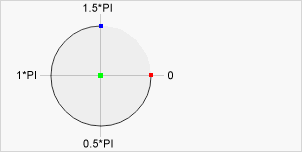 Markaz: arc(100, 75, 50, 0 * Math.PI, 1.5 * Math.PI)
Boshlang‘ich burchak: arc(100, 75, 50, 0, 1.5 * Math.PI)
Oxirgi burchak: arc(100, 75, 50, 0 * Math.PI, 1.5 * Math.PI)
Markaz: arc(100, 75, 50, 0 * Math.PI, 1.5 * Math.PI)
Boshlang‘ich burchak: arc(100, 75, 50, 0, 1.5 * Math.PI)
Oxirgi burchak: arc(100, 75, 50, 0 * Math.PI, 1.5 * Math.PI)
Misol
Bu yerda boshlang‘ich burchagi 0, oxirgi burchagi 0.5 * PI bo‘lgan yoy chizmoqchimiz:
<script>
const canvas = document.getElementById("myCanvas");
const ctx = canvas.getContext("2d");
ctx.beginPath();
ctx.arc(95, 50, 40, 0, 0.5 * Math.PI);
ctx.stroke();
</script>
O‘zingiz sinab ko‘ring »
Misol
Bu yerda xuddi shu ishni bajaramiz, ammo counterclockwise parametri true qilib belgilangan (bunda yoy boshlang‘ich va oxirgi burchak orasida soat miliga teskari yo‘nalishda chiziladi):
<script>
const canvas = document.getElementById("myCanvas");
const ctx = canvas.getContext("2d");
ctx.beginPath();
ctx.arc(95, 50, 40, 0, 0.5 * Math.PI, true);
ctx.stroke();
</script>
O‘zingiz sinab ko‘ring »
Shuningdek qarang:
W3Schools Pathfinder
Yutuqlaringizni kuzating – bu bepul!